Snap Inc. continues to refine and expand the capabilities of Lens Studio, offering developers new creative tools and much-needed stability enhancements in the 5.8 and 5.8.1 updates.
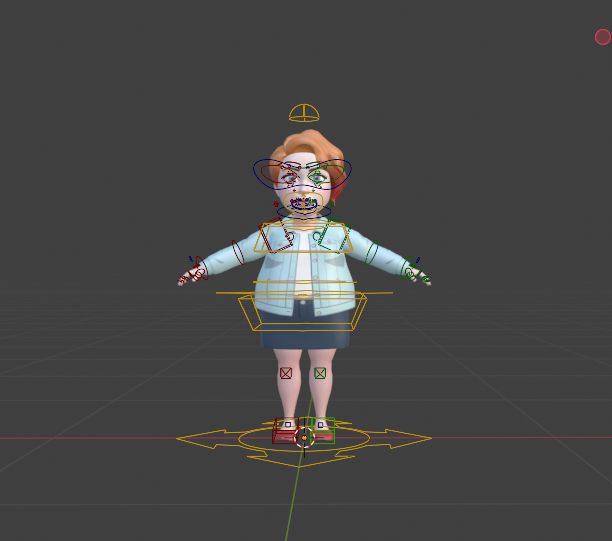
The most exciting new capability being the addition of the Bitmoji 3D Rig, allowing developers to animate Bitmoji in Blender, Autodesk and Mixamo.
What’s New
✍️ Markdown Support
Lens Studio now supports Markdown files as assets, allowing developers to embed detailed documentation directly into their projects. View these files in the all-new Markdown Panel.
- Attach Markdown files to Custom Components and Packages
- Include hosted images for richer, clearer documentation
Bitmoji 3D Rig & Animation Tools
A full Bitmoji 3D rig is now available, along with export tools compatible with Blender, making it easier than ever to create and animate advanced Bitmoji avatars.
Easy Lens Enhancements
- Head Morph
Transform your head into 3D characters or animals using generative morphing. - Enhanced Face Events
Trigger experiences based on head tilt or specific facial feature coordinates (e.g., mouth, nose, eyes). - Window Cutout
Automatically generate cutout-style images placing the user (or a friend) inside transparent shapes. You can even use existing media for double cutouts. - Stereo View Index Support
New data point returns the left/right eye view (0/1) in stereo cameras. Returns 0 for mono.
Improvements
- API Documentation Enhancements
- Deprecated APIs are now filterable
- Privacy restrictions are clearly listed
- Custom Code Node Sampling Curves
Now supports wrap modes - Body Segmentation Texture
Added “Invert Mask” option
Stability & Bug Fixes (5.8 & 5.8.1)
- Improved overall application stability, reducing crash scenarios
- Fixed multiple crash scenarios including:
- Dragging assets in Asset Browser
- Plugin updates
- Custom Code node focus
- Project closing/opening sequences
- Resolved issues with:
- Shader Graph rendering
- Package updates from Asset Library
- VFX asset initialization
- Project duplication bugs
- Plugin permission saving
- The Easy Lens news banner’s “Easy Lens” button now works as expected